Professional WtE plant simulator
The dynamic Waste-to-Energy simulator built to train operators on running an energy-from-waste plant.
Combustion, boiler, water-steam cycle, turbine, flue-gas treatment, automation and upset conditions brought together in a single simulation environment.
The journey
Four steps, from a first visit to this site through to training teams on the simulator.
Understand what the simulator covers: the systems of a WtE plant, the control loops and the situations it reproduces.
See the tool running, against your own operating questions and use cases.
Take the controls: run the three lines, the water-steam cycle, the turbine and flue-gas treatment.
Prepare teams, support skill-building and approach real operations with more confidence.
From discovery to field performance.
Why a simulator?
Some situations are too rare, too costly or too risky to be deliberately reproduced on a real plant.
Yet when they do happen, the operator has to recognise them and react correctly.
WTE Simulator reproduces those situations in an environment with no consequence for the real plant.
The operator can experiment, understand the effects of their decisions and progress at their own pace.
Understand how the plant works as a whole and how the equipment interacts.
Practise normal operation, transient phases and upset conditions.
Observe the decisions taken, spot the difficulties and measure progress.
Build the right reflexes with no risk to the real plant.
See a scenario in action
See how a fault propagates through the plant and how the operator reacts to stabilise the process.
The plant runs at its nominal conditions.
A piece of equipment trips or a process condition drifts.
Priorities, line number and acknowledgement cycle, following ISA-18.2 principles.
Every action changes the state of the plant.
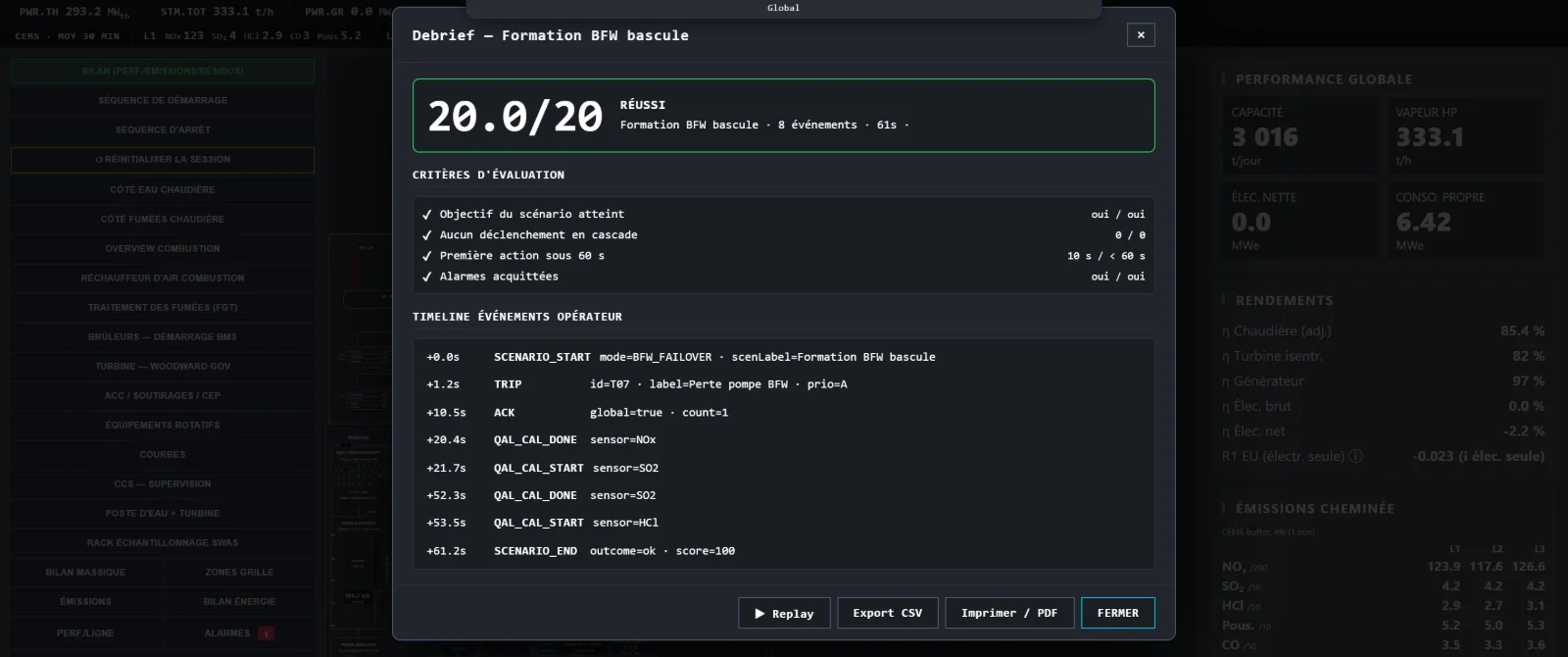
The scenario is debriefed, scored and can be replayed.
A complete WtE plant
Operating a WtE plant is not just about the furnace. A change in combustion can affect steam production, the turbine, flue-gas treatment and many control loops.
Explore the simulated systems →Grate, waste, calorific value, primary and secondary air.
Steam production, heat exchange, desuperheating.
Drum, feedwater, condensate and level control.
Steam admission, run-up, grid synchronisation.
Reagents, bag filter, continuous emissions monitoring.
Controllers, permissives, interlocks and sequences.
A dynamic process
The plant's behaviour changes with process conditions, automation and the operator's actions.
Two different operating strategies can drive the plant down two different paths.
The point is not to learn where to click. The point is to learn to understand what is happening.
Realistic situations
Start-up, shutdown, fuel variation, combustion drift, equipment failure or upset conditions: practise in a safe environment.
See the training scenarios →The control loops, interlocks and sequences are not imagined: they are translated from plant drawings and logic diagrams. The thresholds are the ones the job uses, the two-second temperature at 850 °C, the rolling averages of Annex VI of Directive 2010/75/EU.
That is what an operator recognises within thirty seconds.
“Distilling more than twenty years of operating and commissioning waste-to-energy plants into a tool where you learn by doing.”
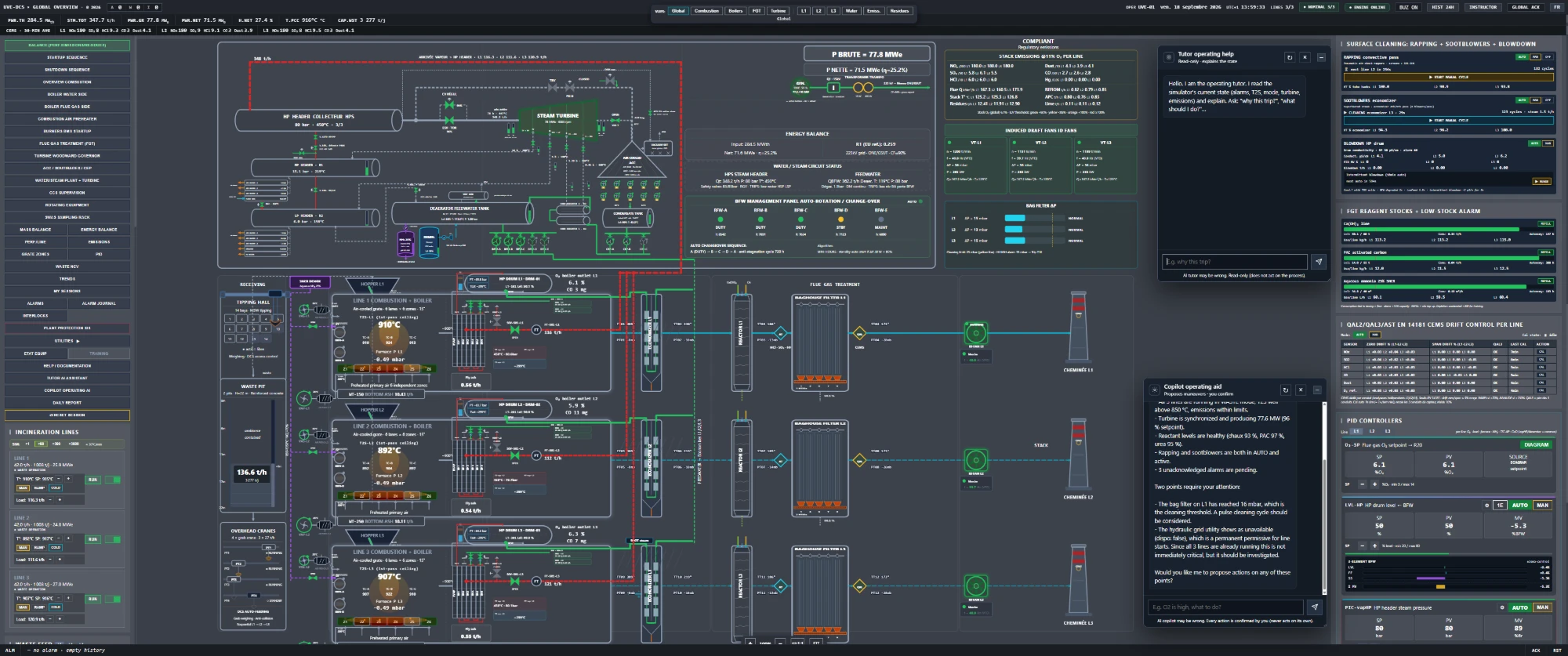
Every subsystem is modelled, instrumented and controllable, just like a real control desk. From waste to the power grid.
Not an animation: a coherent process model, instrumented with control-room rigor.
Control loops and safeties translated from plant drawings and logic diagrams.
Instrument tags and equipment references (TT, PT, FT) as on site.
Heat balances, steam enthalpies, PID controllers, smoothing: computed every second.
Rolling averages, limit values and continuous monitoring per Annex VI of Directive 2010/75/EU.
Two AIs built into the desk: a tutor that reads the live state and explains the “why” (trips, interlocks, emissions), and a copilot that proposes the right maneuvers. The operator confirms every action, up to chaining a full sequence (e.g. turbine start-up).
Real operating views, not mockups. And the assessment screen the trainee gets at the end of a scenario.


Three plans to fit your need. Secure, named access, on request.
1 seat · evaluation or individual learner
Several operators · training group
Plant operator · training center · EPC
Pricing tailored to operator count and access duration. A controlled, named-access tool granted after subscription. Already a client? Client login →
The questions plant operators and training centres actually ask, answered plainly.
No. The simulator opens in a browser, on an ordinary desktop machine. No installation, no administrator rights, nothing to deploy on your network.
Each seat is named and runs its own simulated plant: two trainees never interfere with each other. The number of concurrent seats depends on the plan.
The time it takes to open a browser and sign in. Depending on the scenario, the plant starts cold or you take over a plant already running.
Yes, as long as the browser is current and the domain is reachable. No plug-in, no extension, no special port to open.
Yes. It lets you inject faults during the session, follow trainees' sessions and review their assessment.
A score out of twenty, the criteria met or missed, and a timestamped timeline of every maneuver. The history is kept per account and prints out: the document serves as a certificate for the trainee's file.
The control loops, safety interlocks and sequences in WTE Simulator are translated from plant drawings and logic diagrams. Limit values and rolling averages follow Annex VI of Directive 2010/75/EU. It is not a copy of any identifiable plant.
Yes, on the Site plan. Custom scenarios can be written from your own operating situations and procedures.
No. The tutor explains, the copilot proposes. No maneuver runs without the operator's confirmation, and the most sensitive actions require two.
Pricing depends on the number of seats and the subscription period. Everything goes through a quote, issued within a few days after a scoping conversation.
A controlled-access training tool. Request your access. Quick reply.
Or write to [email protected]